Localizing Swift Packages with String Catalogs
Dec 14, 2025 ·
I recently gave a talk at CocoaHeads Stockholm, on how to use Xcode string catalogs to localize Swift packages, and how to create a shared translations package. Let’s see what the big deal is.
Xcode String Catalogs
Xcode string catalogs were introduced at WWDC 23 as a replacement for Localizable.strings. It lets you manage all locales, as well as device and plural variations, with a single catalog file.
The string catalog file format is .xcstrings and while this may seem fancy and Xcode renders these files in a very sophisticated way, it’s just a plain JSON file.
String Catalogs Benefits
After adding a Localizable.xcstrings to your project, Xcode will automatically generate keys in this file as you add new key references to your code and views.
For instance, adding this to a SwiftUI file will generate the corresponding key within the catalog file:
Text("HomeScreen.Greeting")
Xcode will automatically keep track of your keys and show you if a translated key is no longer in use:

Xcode will also automatically remove untranslated keys if the key reference is removed from code, and will show you the translation state of all additional languages.
Additional benefits of using a string catalog is that it’s super easy to vary a key by plural or device:
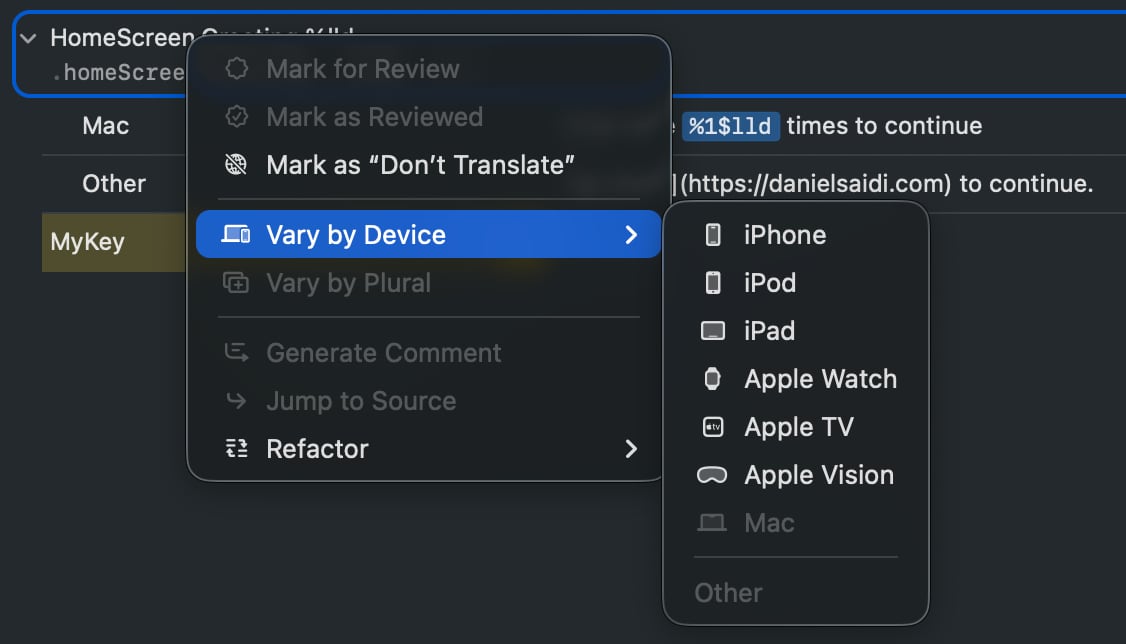
You can add parameters to a key, then use them to inject ints, doubles and strings into the string:

String catalogs even support Markdown! This, in combination with SwiftUI’s Markdown support, will add a link to the text above, when it’s rendered on all platforms except macOS.
Drawbacks
While string catalogs was a huge improvement from the old .strings file, it’s still easy to break your localization by changing the key in your code, either intentionally or by accident.
Text("HomeScreen.Greeting ") // Typo
This would mark the old key as “stale” in the catalog, and add a new key to the catalog. The problem is that localization would now be broken, but the code would still compile.
We had this problem with .strings files as well, but with string catalogs we have a way to handle it.
You see, since string catalogs are just JSON files, all stale keys will be properly marked in plain text:
"MyKey" : {
    "comment" : "",
    "extractionState" : "stale",     // <-- HERE
    "isCommentAutoGenerated" : true,
    "localizations" : {
    "en" : {
        "stringUnit" : {
        "state" : "translated",
        "value" : "My Key"
        }
    }
    }
}
This means that we can have our CI or build pipelines check if the plain JSON file contains any stale keys, and fail the build if so is the case.
But in my opinion, this never sat well with me. I would prefer to have proper symbols, like the ones Xcode generated for asset catalogs. And in Xcode 26, we get just that.
Xcode 26 String Catalog Improvements
Xcode 26 improves string catalog usage by generating symbols for keys that are manually added to a string catalog, including support for parameters and the string variations from before:

We can then use these auto-generated symbols directly in our code, like this:
Text(.homeScreenGreeting(10))
These generated symbols remove the hassle of having to specify the key bundle, which was a huge pain and source of error when defining translations in a Swift package.
This also gives us compile-time safety, since removing keys in use will give us compile-time errors. I really love this addition in Xcode 26.
Remaining Drawbacks
While Xcode 26’s string catalog symbol generation is a big improvement, there are still some things to consider when using string catalogs with Swift packages.
For a UI component package, the above would works great. The generated LocalizedStringResource values would simplify things a lot by removing the need to define a bundle.
However, if we want to set up a shared translation package with keys that can be used from many packages and apps in an organization, the auto-generated symbols won’t work on their own.
The reason for this is that the generated symbols are internal, which means that they can only be accessed from within the package itself. This means that other targets can’t access them.
Generating Public Key References
To work around the limitations of internal symbols, we can create a public symbol for each internal symbol. I have written about this in this blog post and given a talk about it as well.
During this talk, I was recommended to look into Xcode build plugins, which looks promising. Feel free to check out the post and the talk and let me know what you think.
Discussions & More
If you found this interesting, please share your thoughts on Bluesky and Mastodon. Make sure to follow to be notified when new content is published.