A Better Way to Localize Swift Packages with Xcode String Catalogs
Dec 2, 2025 ·
Xcode 26 fixes many problems involved in localizing Swift Packages with Xcode String Catalogs. Let’s see how we can use its automatically generated, internal symbol to translate text in any target.
Xcode String Catalogs - The Basics
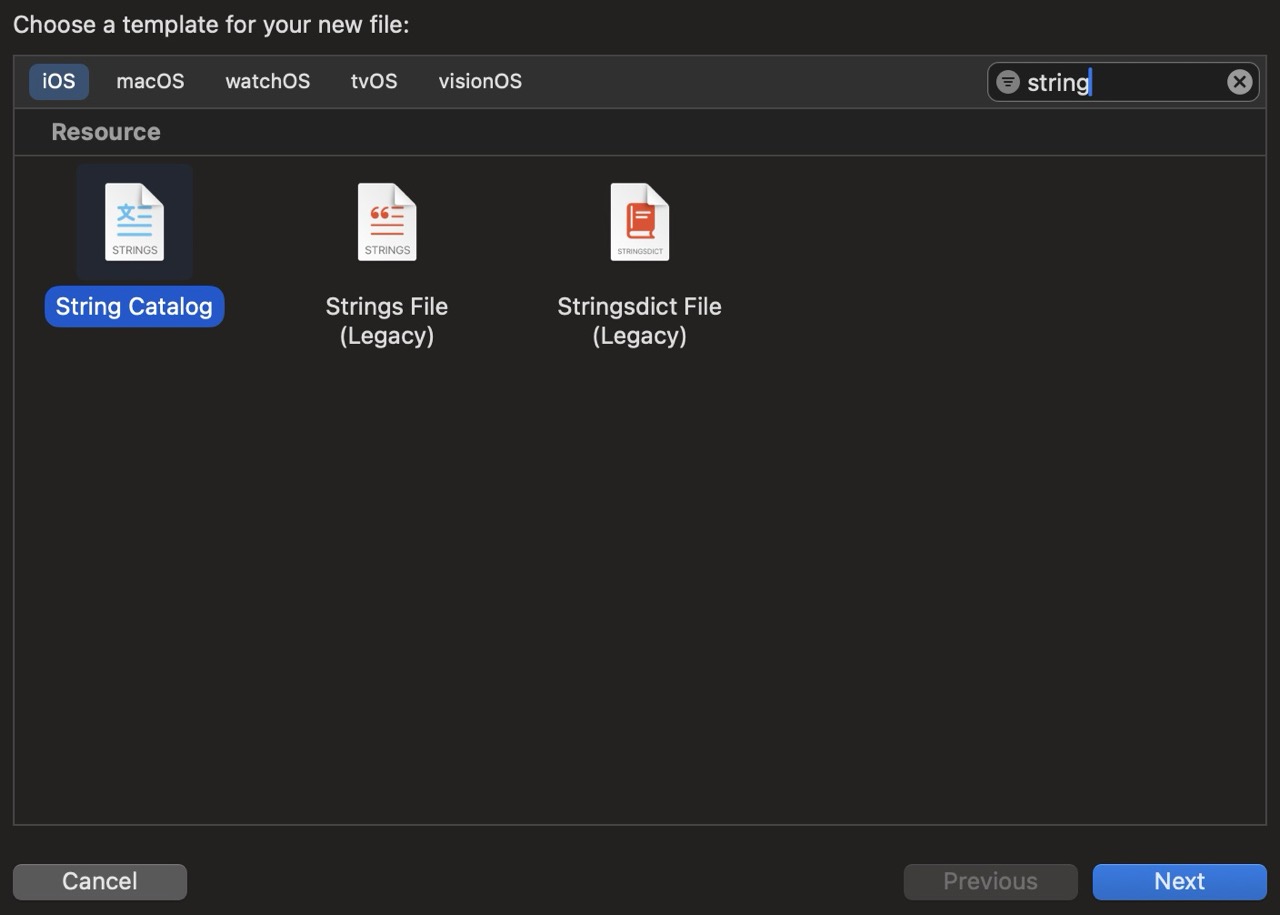
String catalogs were introduced in Xcode 15, as a replacement for the Localizable.strings file type. All you have to do is to add a string catalog to your app, Swift Package, or any target:
After this, all LocalizedStringKey and LocalizedStringResource you use are automatically added to the string catalog. For instance, if you add a LocalizedStringKey-based view like this:
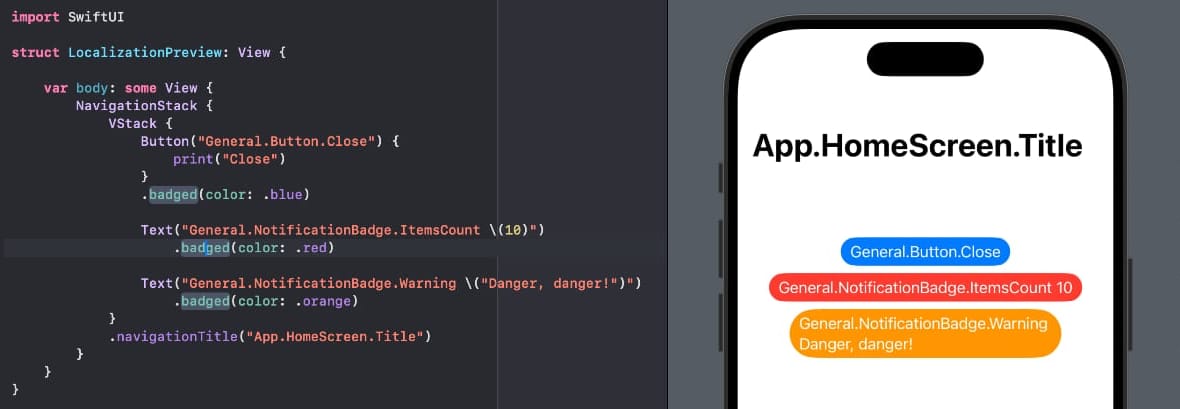
Xcode will automatically add these keys to Localizable.xcstrings, including parameter support. You can then translate the strings, add support for more languages, etc. directly inside the catalog:
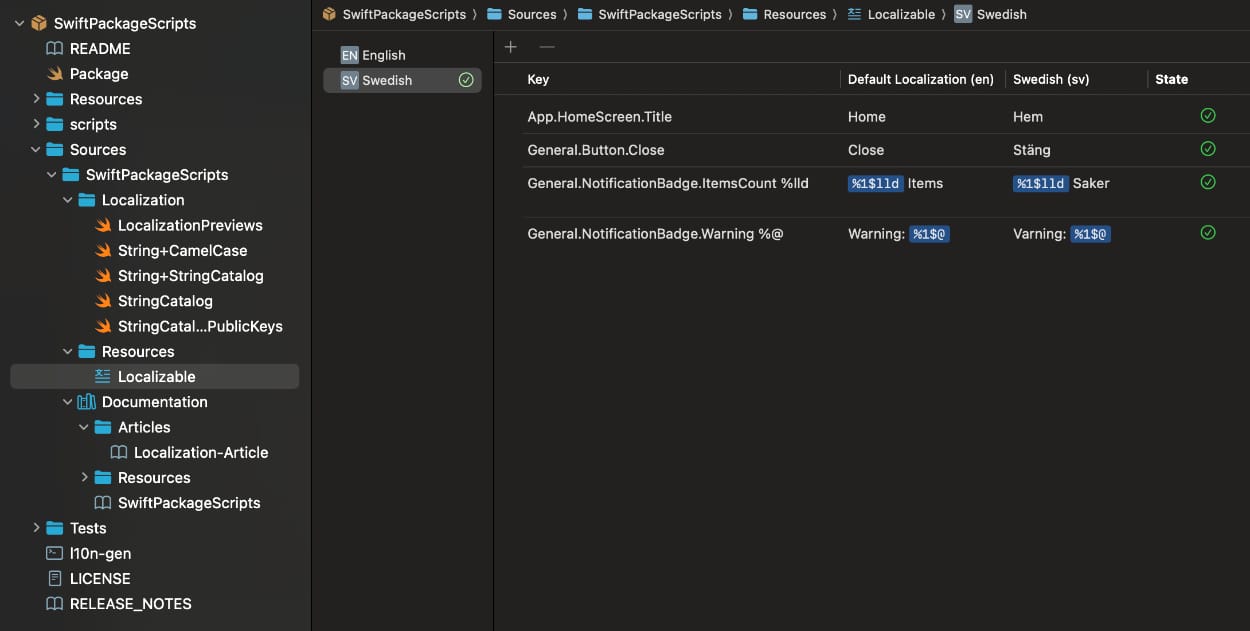
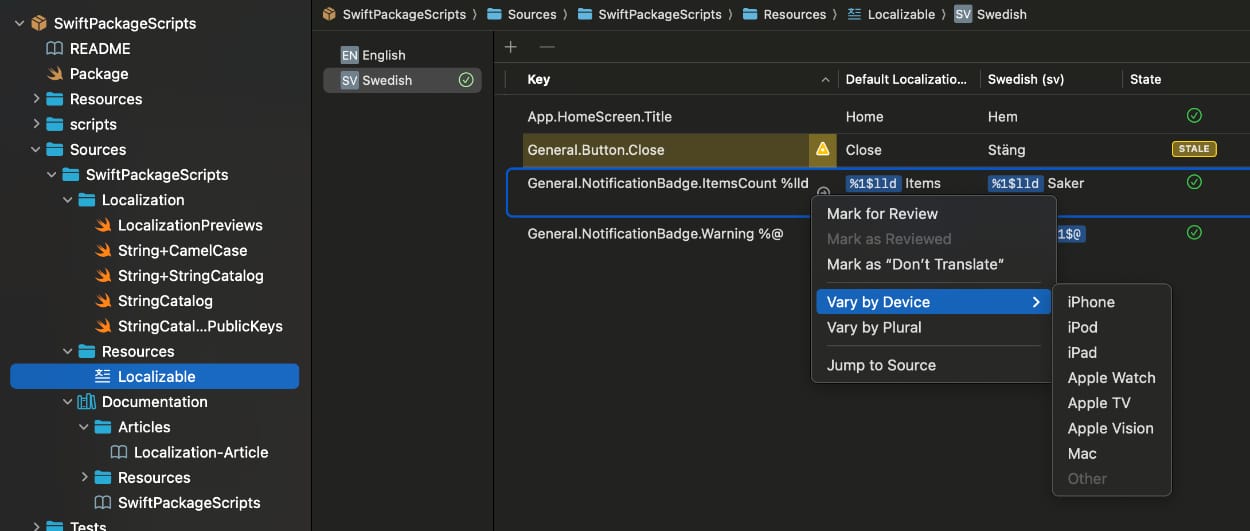
String catalogs make it easy to gather all translations in a single place, and will automatically display the state of all keys, highlight stale keys, etc. You can even vary strings by device and plural!
While this is convenient, there are some drawback to consider. You will also notice that while using string catalogs in apps is straightforward, there are some challenges involved with Swift Packages.
Xcode String Catalogs - Some Drawbacks
While having Xcode automatically adding keys is convenient, I don’t like the string-based approach.
For instance, let’s say that you accidentally make a typo in an already localized string:
struct LocalizationPreview: View {

    var body: some View {
        NavigationStack {
            VStack {
                Button("General.Button.Closegewa") {   // <-- Woopsie!
                    print("Close")
                }
                .badged(color: .blue)
Since we’re just using strings, this will just cause Xcode to add a new string to the string catalog and mark the old string as stale:
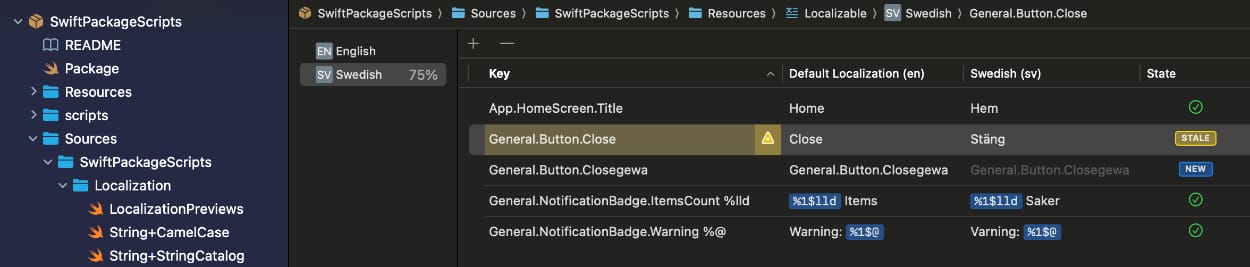
This is very brittle and means that a typo can make localization break without us noticing anything.
Another problem is that SwiftUI uses the .main bundle by default. This means that strings from an external package will not work by default, since they aren’t defined in the main bundle:
A Swift package must therefore explicitly use the .module bundle for its own translations to work:
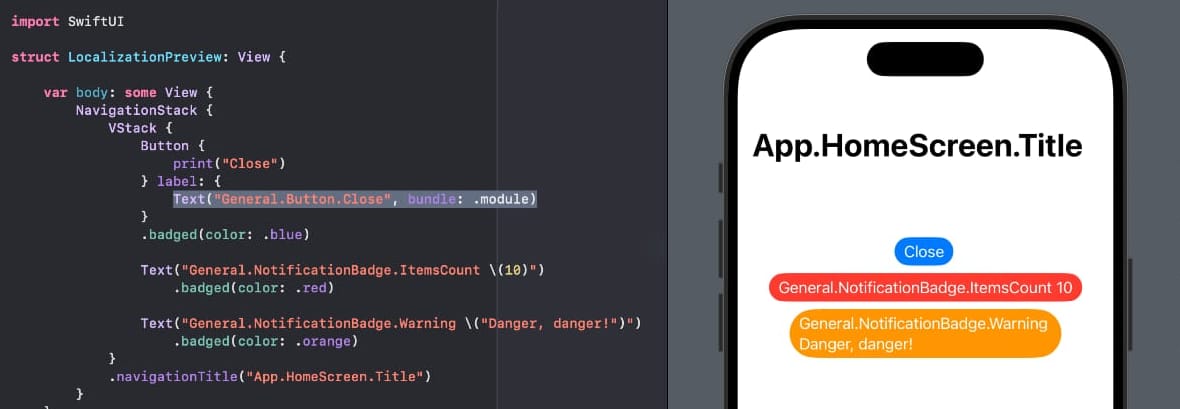
This is tedious and error-prone, and would also require additional bundle handling to use the keys in other apps or packages, since the package bundle isn’t available there.
Let’s see how we can use Xcode 26’s improved catalog handling and automations to improve things.
Xcode 26 - What’s new?
Xcode 26 bumps the string catalog format from 1.0 to 1.1, which adds several new capabilities.
One addition is that Xcode can automatically generate symbols for strings that are manually added with the topmost + button, which in Xcode 26 applies "extractionState" : "manual" to the key.
Xcode 26 will extract keys by removing all periods and camel-case the key. An App.HomeScreen.Title key would thus result in an .appHomeScreenTitle symbol.
These symbols are LocalizedStringResources, which means that we can use them directly in SwiftUI:
Text(.appHomeScreenTitle)
This is a huge step forward, since removing a key from a string catalog will not cause a compile-time error if the code still refers to that key. This drastically reduces the risk of localization errors.
There’s just one big drawback with this otherwise amazing feature - these symbols are internal, and can as such only be used within the same target. They can’t be accessed by other apps or packages.
Let’s see if we can find a way to automatically expose the generated symbols with public wrappers.
Exposing the generated symbols with public ones
To find a way to fix this problem for my open- and closed-source projects, I decided to create a new script for SwiftPackageScripts, which is an open-source project with Swift Package-related scripts.
The script is called l10n-gen and is a terminal script that uses a Swift Command-Line Tool to parse a string catalog and generate public keys for the internal symbols.
#!/bin/bash

# Exit immediately if a command exits with a non-zero status
set -e

# Function to display usage information
show_usage() {
    echo
    echo "This script generates Swift code from a string catalog file."

    echo
    echo "Usage:"
    echo "  $0 --from <CATALOG_PATH> --to <OUTPUT_PATH> [--root <ROOT_NAMESPACE>]"
    echo "  $0 --package <PACKAGE_PATH> --catalog <CATALOG_PATH> --target <TARGET_PATH> [--root <ROOT_NAMESPACE>]"

    echo
    echo "Options:"
    echo "  --from          Command-relative path to a source string catalog"
    echo "  --to            Command-relative path to a target output file"
    echo "  --package       Command-relative path to a Swift Package"
    echo "  --catalog       Package-relative path to the string catalog"
    echo "  --target        Package-relative path to the target output file"
    echo "  --root          The root namespace of the key hierarchy, by default l10n."
    echo "  -h, --help      Show this help message"

    echo
    echo "Examples:"
    echo "  $0 --from Resources/Localizable.xcstrings --to Sources/Generated/L10n.swift"
    echo "  $0 --package Sources/MyPackage/ --catalog Resources/Localizable.xcstrings --target Generated/L10n.swift --root myPackageName"

    echo
    echo "Important:"
    echo "  This script calls out to the Swift-based CLI tools/StringCatalogKeyBuilder."
    echo
}

# Function to display error message, show usage, and exit
show_error_and_exit() {
    echo
    local error_message="$1"
    echo "Error: $error_message"
    show_usage
    exit 1
}

# Function to get absolute path
get_absolute_path() {
    local path="$1"
    if [[ "$path" = /* ]]; then
        # Already absolute
        echo "$path"
    else
        # Make it absolute relative to current directory
        echo "$(cd "$(dirname "$path")" 2>/dev/null && pwd)/$(basename "$path")"
    fi
}

# Define argument variables
FROM=""
TO=""
PACKAGE=""
CATALOG=""
TARGET=""
ROOT=""

# Parse command line arguments
while [[ $# -gt 0 ]]; do
    case $1 in
        -h|--help)
            show_usage; exit 0 ;;
        --from)
            FROM="$2"; shift 2 ;;
        --to)
            TO="$2"; shift 2 ;;
        --package)
            PACKAGE="$2"; shift 2 ;;
        --catalog)
            CATALOG="$2"; shift 2 ;;
        --target)
            TARGET="$2"; shift 2 ;;
        --root)
            ROOT="$2"; shift 2 ;;
        -*)
            show_error_and_exit "Unknown option $1" ;;
        *)
            show_error_and_exit "Unexpected argument '$1'" ;;
    esac
done

# Validate arguments
if [ -n "$FROM" ] || [ -n "$TO" ]; then

    # Using --from/--to mode
    if [ -z "$FROM" ]; then
        show_error_and_exit "--from is required when using --from/--to mode"
    fi
    if [ -z "$TO" ]; then
        show_error_and_exit "--to is required when using --from/--to mode"
    fi
    if [ -n "$PACKAGE" ] || [ -n "$CATALOG" ] || [ -n "$TARGET" ]; then
        show_error_and_exit "Cannot mix --from/--to with --package/--catalog/--target"
    fi

    # Verify source file exists
    if [ ! -f "$FROM" ]; then
        show_error_and_exit "Source catalog '$FROM' does not exist"
    fi

    # Remove target file
    if [ -f "$TO" ]; then
        rm "$TO"
    fi

    # Convert to absolute paths
    FROM_ABS=$(get_absolute_path "$FROM")
    TO_ABS=$(get_absolute_path "$TO")

    # Build arguments
    ARGS="--from \"$FROM_ABS\" --to \"$TO_ABS\""

    # Add root namespace if specified
    if [ -n "$ROOT" ]; then
        ARGS="$ARGS --root \"$ROOT\""
    fi

elif [ -n "$PACKAGE" ] || [ -n "$CATALOG" ] || [ -n "$TARGET" ]; then
    # Using --package/--catalog/--target mode
    if [ -z "$PACKAGE" ]; then
        show_error_and_exit "--package is required when using --package/--catalog/--target mode"
    fi
    if [ -z "$CATALOG" ]; then
        show_error_and_exit "--catalog is required when using --package/--catalog/--target mode"
    fi
    if [ -z "$TARGET" ]; then
        show_error_and_exit "--target is required when using --package/--catalog/--target mode"
    fi

    # Verify package directory exists
    if [ ! -d "$PACKAGE" ]; then
        show_error_and_exit "Package directory '$PACKAGE' does not exist"
    fi

    # Remove target file
    if [ -f "$PACKAGE/$TARGET" ]; then
        rm "$PACKAGE/$TARGET"
    fi

    # Convert package to absolute path (catalog and target remain relative to package)
    PACKAGE_ABS=$(get_absolute_path "$PACKAGE")

    # Build arguments
    ARGS="--package \"$PACKAGE_ABS/\" --catalog \"$CATALOG\" --target \"$TARGET\""

    # Add root namespace if specified
    if [ -n "$ROOT" ]; then
        ARGS="$ARGS --root \"$ROOT\""
    fi

else
    show_error_and_exit "Either --from/--to or --package/--catalog/--target must be provided"
fi

# Define the tool directory
TOOL_DIR="scripts/tools/StringCatalogKeyBuilder"

# Verify tool directory exists
if [ ! -d "$TOOL_DIR" ]; then
    show_error_and_exit "Tool directory '$TOOL_DIR' does not exist"
fi

# Start script
echo
echo "Generating localization code..."

# Clean build cache and execute command
echo "Cleaning build cache..."
(cd "$TOOL_DIR" && swift package clean)

echo "Running: swift run l10n-gen $ARGS"
(cd "$TOOL_DIR" && eval "swift run l10n-gen $ARGS")

# Complete successfully
echo "Code generation completed successfully!"
echo
The script takes a from and to path, or a package path with a package-relative catalog and target path, and generates a Swift file with public wrappers.
The script will also wrap all generated keys in a root namespace (by default l10n), and split all keys on . to create a nested namespace hierarchy.
This means that the string catalog that we looked at earlier would result in the following code:
import Foundation

// THIS IS A GENERATED FILE
// Run the l10n-gen script to regenerate this file.
public extension LocalizedStringResource {

    enum l10n {
        public enum app {
            public enum homeScreen {
                public static var title: LocalizedStringResource { .appHomeScreenTitle }
            }
        }
        public enum general {
            public enum button {
                public static var close: LocalizedStringResource { .generalButtonClose }
            }
            public enum notificationBadge {
                public static func itemsCount(_ param1: Int) -> LocalizedStringResource { .generalNotificationBadgeItemsCount(param1) }
                public static func warning(_ param1: String) -> LocalizedStringResource { .generalNotificationBadgeWarning(param1) }
            }
        }
    }
}
Since these are all LocalizedStringResource extensions, we can now use them directly with SwiftUI:
Text(.l10n.general.notificationBadge.itemsCount(10))
Since these keys are public, we can use them from other packages and apps as well. Just make sure to use unique root namespaces if you plan on using several string catalogs like this.
Have a look at SwiftPackageScripts for more info, and for the Swift CLI tool that powers this script.
Conclusion
Xcode 26 improves its string catalog capabilities a great deal, but there are still some rough edges involved when adding string catalogs to Swift Packages.
SwiftPackageScripts 2.0 therefore adds an l10n-gen script that generates public keys for internal Xcode 26 generated symbols, to let us use package-defined strings in other apps and packages.
Discussions & More
If you found this interesting, please share your thoughts on Bluesky and Mastodon. Make sure to follow to be notified when new content is published.