Some thoughts following the last crazy weekend of custom keyboards
Nov 24, 2026 ·
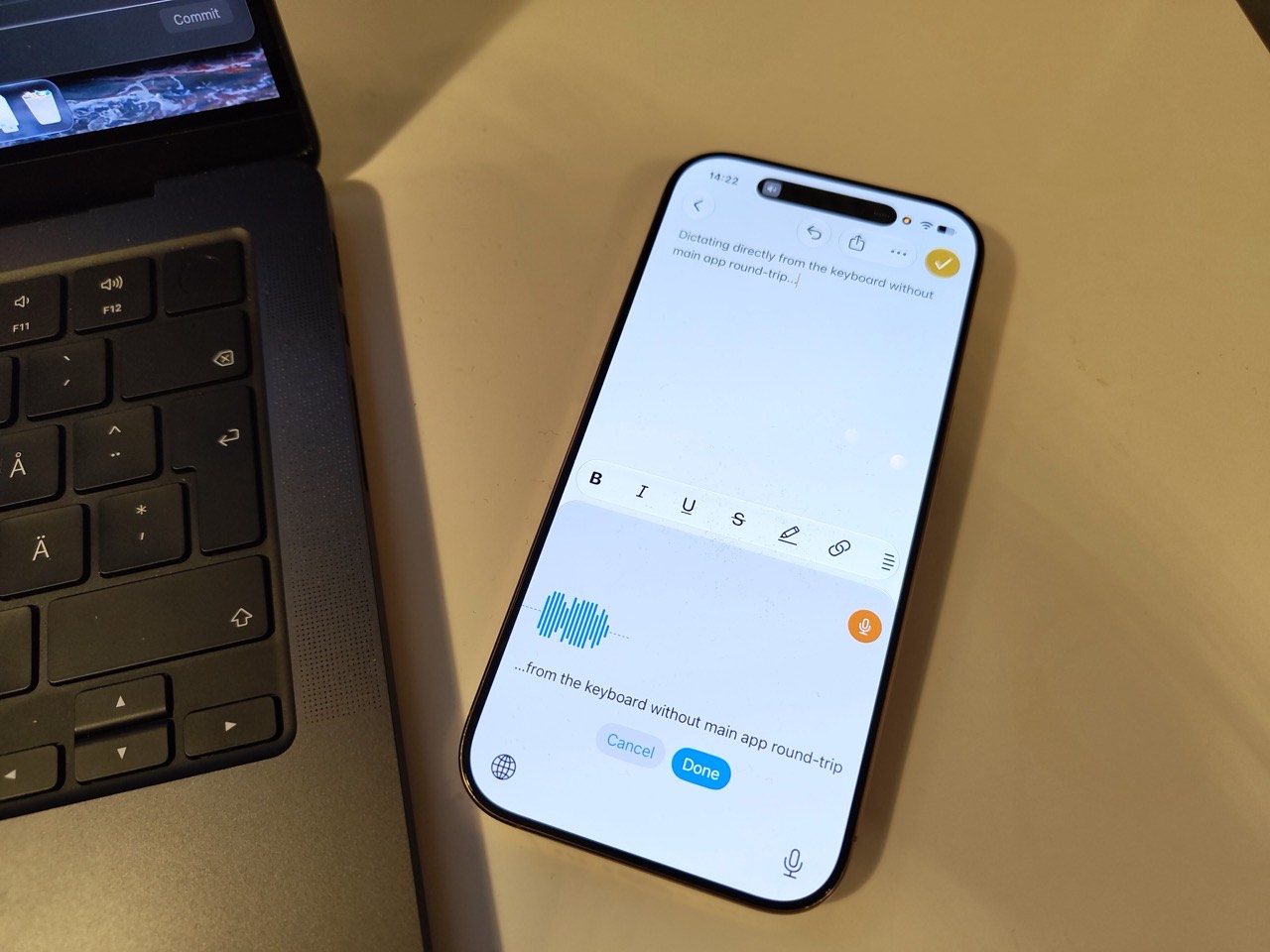
Last weekend was a crazy one for custom keyboards, where Raycast found a way to start dictation directly in a custom iOS keyboard, without a main app round-trip. Here are my reflections on it all.
Why I’m writing about this here
There is already a post about this on the KeyboardKit blog, but that post covers the facts and what we plan to do about it in the SDK. This post is different.
These are my personal reflections after 10+ years of building custom iOS keyboards, not a product or company statement from KeyboardKit. Let’s look at what happened, and what may come.
Background
The background of the story is that custom iOS keyboard extensions don’t have microphone access, which has forced every custom keyboard app to handle this limitation in various ways.
A common workaround to this limitation has been to first open the main app, start recording there, then somehow return to the keyboard to proceed with in-keyboard dictation.
This model opened a can of worms.
For instance, how do you return to the keyboard from the main app? Private APIs have existed, but were patched to no longer work, and newer APIs involving LSApplicationWorkspace started triggering auto-rejection when submitting apps that used them to the App Store.
Another challenge is, how does the main app provide the keyboard extension with dictation data, like transcribed text and volume levels? For the two targets to talk to each other, you must set up an App Group, and for reliable syncing, the keyboard needs Full Access enabled.
After getting navigation and data sync to work, the app also needs to stay alive to perform dictation in the background. This requires mechanisms like Background Mode (audio), which will require you to explain your use of it to Apple when submitting your app to the App Store.
As you can see, it’s not an easy challenge, and this is just one of many restrictions that a custom iOS keyboard extension must handle, together with a nerfed text document proxy and a strict 60-70 MB memory cap.
It’s in this highly restricted context that Raycast managed to catch everyone off guard, by figuring out how to access the microphone and perform dictation directly from the keyboard extension.
The Raycast weekend
Last weekend, Johan Thorell at Raycast shared how he had solved in-keyboard dictation by letting the keyboard use an embedded web view to handle the microphone.
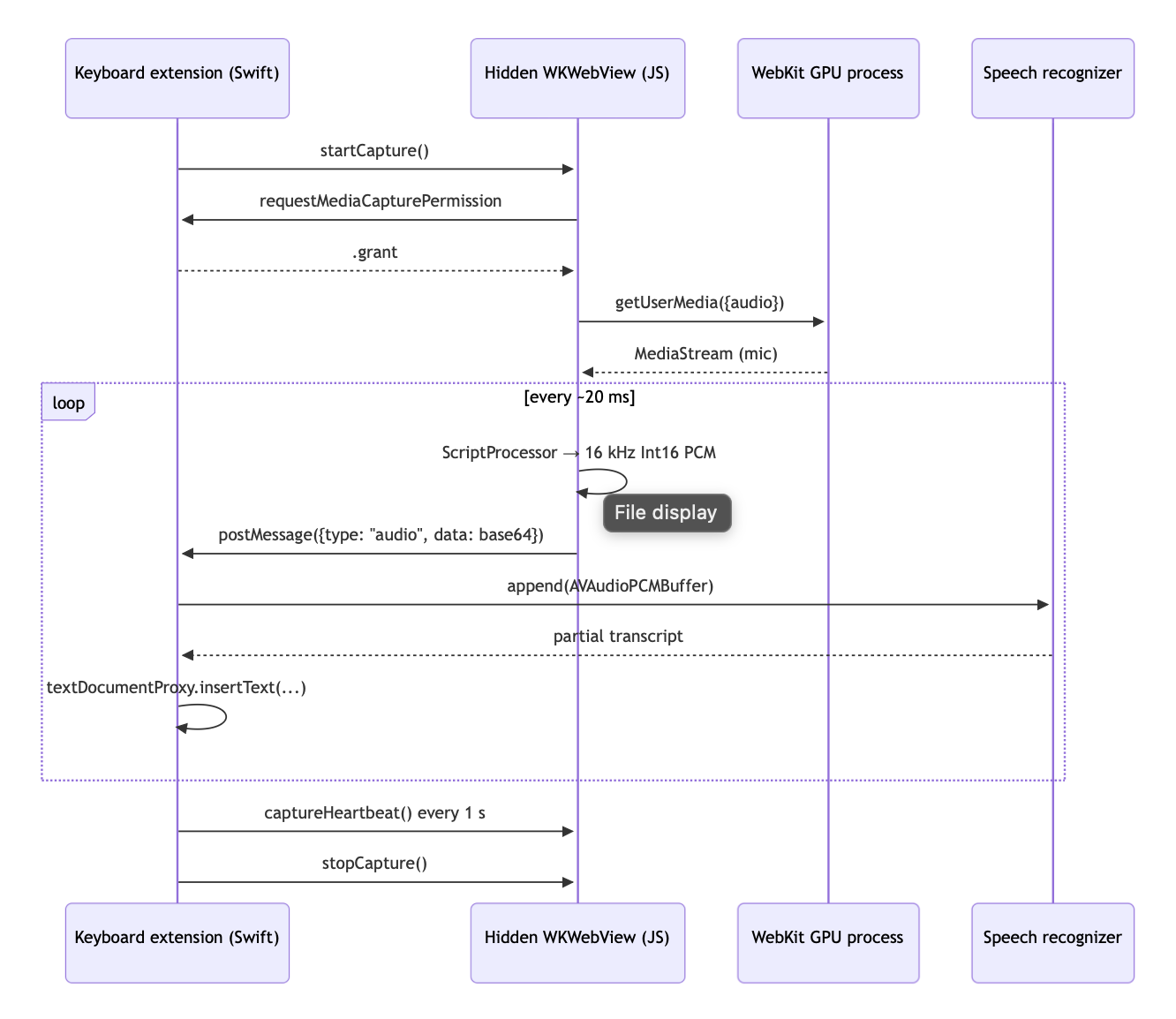
Shortly after this, Stephan Cilliers shared a repository that outlines the architecture and has code to reproduce it, including a detailed diagram of the parts involved.
The keyboard community went crazy. People who have built keyboards for years, and who have all fought the same limitation, suddenly had a way to dictate text straight into the keyboard.
I verified that it works, and we have already added it to KeyboardKit as a new, experimental engine.
How it works
The trick turns out to not record audio in the keyboard extension, but to let WebKit do it instead.
Recording audio with tools like AVAudioEngine and AudioQueue in a keyboard extension is unreliable, and tends to get the extension killed or invalidated by the host app, even with Full Access enabled.
A keyboard extension can however embed a tiny, nearly invisible WKWebView, and use the web getUserMedia API, which captures audio in WebKit’s own processes instead of the keyboard’s.
The repository describes the setup like this:
- An invisible web view - The keyboard adds a tiny
WKWebViewto its view hierarchy. It must stay in the window, since WebKit throttles web views that aren’t, and set to allow inline media playback. - A secure context -
getUserMediais only available for secure origins, so the HTML is loaded with anhttpsbase URL that is never actually fetched. - Permission - The web view’s UI delegate grants microphone access. The microphone & speech recognition permissions are required in both targets, and are requested once in the main app.
- Raw audio out of JavaScript - The web page opens the microphone, taps the audio stream, and downsamples it to 16 kHz PCM.
- Native bridge - The audio is posted to the native code as small base64-encoded chunks, through a script message handler.
- A dead man’s switch - The native code sends a heartbeat to the page every second. If it stops, for instance if the keyboard is dismissed or crashes, the page stops the microphone by itself.
- Transcription - The native code turns each chunk into an audio buffer and feeds it to Apple’s speech recognizer, then inserts the transcribed text with the text document proxy.
That’s it. No private APIs, no main app round-trip, and no background audio mode to keep the main app alive. It’s quite brilliant. But in all honesty, why is it even needed in the first place?
A history of hacks and workarounds
I have built KeyboardKit for 10+ years. During that time, I have seen many workarounds to Apple’s strict custom keyboard limitations, and ways in which Apple has handled them.
Based on this, here are some ways in which Apple can stop this from working, if they decide to do it.
1. iOS patch
One way for Apple to stop this workaround is to simply disable it in a new iOS version. This happens quite often, and perhaps not always intentionally.
For instance, a trick that made UITextChecker provide next word prediction stopped working in iOS 16. Greek and Hungarian autocomplete stopped working in iOS 27. The list goes on.
The result is that the workaround will keep working on older iOS versions, but stop working on new ones. You can still use it, but your users will start losing the feature as they update their devices.
2. App Store Connect rejection
A second way for Apple to stop this is that they start to auto-detect certain API or permission usage in the keyboard extension, and reject any app that uses it.
We have seen this with LSApplicationWorkspace, which keyboards used to return to the host app, by opening it with its bundle ID. Apple started auto-detecting it, and rejecting any app that used it.
This is most frustrating, since apps that were approved before the auto-rejection will keep working in the App Store, until Apple manually removes them, which may never happen. Meanwhile, other developers can’t submit apps that use the same APIs.
This has many undesirable side effects. First, it creates an uneven playing field, where some apps are “allowed” to use unsafe APIs, while others aren’t. It also discourages approved apps from ever updating, since an update could cost them a competitive advantage.
3. Crashes
A third option is that Apple removes or fixes the workaround in a way that makes your code crash at runtime, when running on a new version of iOS.
We recently saw this in iOS 26.4, where some private APIs that were used to detect the host app started crashing due to some old Objective-C and Swift string conversion.
This is really bad for your users, since they don’t just lose the feature, they lose the entire keyboard, since it can start crashing on launch. This in turn exposes you to the risk of 1 star reviews.
A reason to be hopeful
Instead of ending on a negative note, allow me to be hopeful.
The excitement in the community this weekend was huge, for something as simple as being able to use the microphone in a keyboard. Apple MAY notice this, and realize how much people want this.
Voice AI is a very common custom keyboard feature, and something that many industries do need. Perhaps this will make Apple reconsider their microphone restrictions, since providing public APIs for a keyboard to access the microphone is way safer than this web-based workaround.
And if they do, perhaps they will also, finally, reconsider other limitations, like the hard 60-70 MB memory cap that makes it impossible to use more sophisticated AI models in a keyboard extension.
Because guess what? Some people are already using the same web workaround to do that too.
So, Apple, if you’re reading this: people clearly want to build amazing keyboards. Please let us do it, without having to hide behind invisible web views.
Discussions & More
If you found this interesting, please share your thoughts on Bluesky and Mastodon. Make sure to follow to be notified when new content is published.